Celmis exposes its index over the Model Context Protocol, so an agent or an editor can search symbols, read API surfaces and find who calls what — instead of grepping a checkout it does not have, or being handed a second copy of your code to keep.
It is the same index the web interface reads, under the same access rules. A client that may not read a repository cannot read it over MCP either.
#The endpoint
The running stack serves MCP at /mcp/. Mint a token from Settings → MCP in the
interface, or from the command line:
docker compose exec api analyzer mcp issue-token \
  --scopes "read:graph read:groups" --duration 86400
Then point a client at it:
// ~/.claude.json, or .mcp.json in a project
{
  "mcpServers": {
    "celmis": {
      "type": "http",
      "url": "http://localhost:8000/mcp/",
      "headers": { "Authorization": "Bearer <the token you just minted>" }
    }
  }
}
There is also a stdio transport, without the HTTP hop:
{
  "mcpServers": {
    "celmis": {
      "command": "docker",
      "args": ["compose", "exec", "-T", "api", "analyzer", "mcp", "serve"]
    }
  }
}
The two transports are not the same set. stdio serves thirteen older, graph-shaped
tools — find_symbol, find_callers, query_graph. The HTTP mount serves the eighteen
below. Neither is a subset of the other, so pick the transport for the tools you want
rather than for the convenience.
#A real session
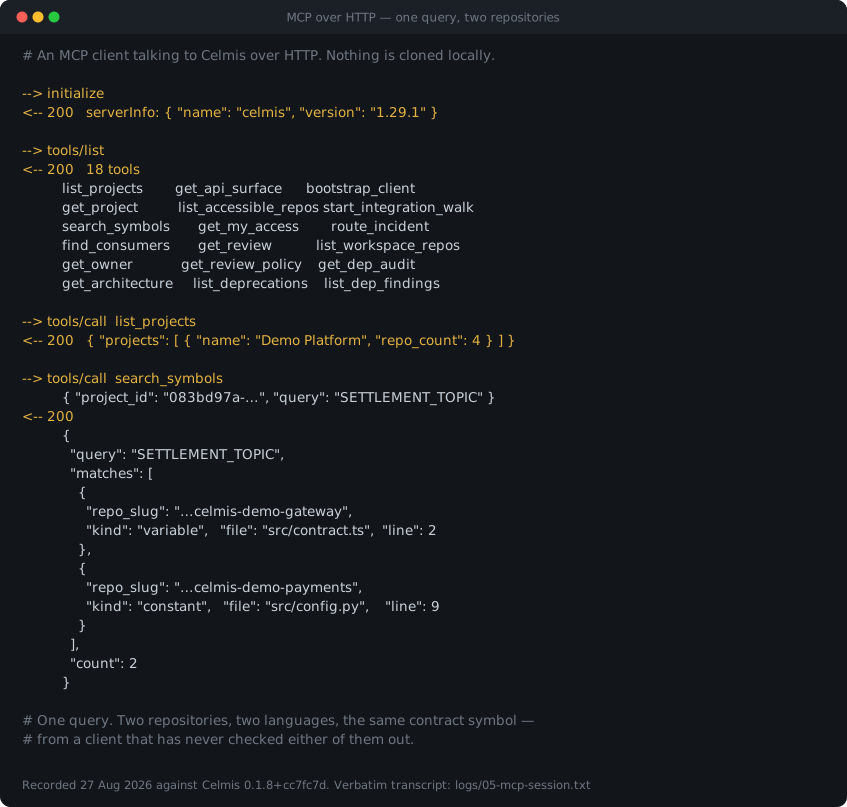
One query, resolved across two repositories and two languages, from a client that has never checked either of them out:
--> initialize
<-- 200   serverInfo: { "name": "celmis", "version": "1.29.1" }

--> tools/list
<-- 200   18 tools

--> tools/call  search_symbols
          { "project_id": "083bd97a-…", "query": "SETTLEMENT_TOPIC" }
<-- 200
          {
            "query": "SETTLEMENT_TOPIC",
            "matches": [
              { "repo_slug": "…celmis-demo-gateway",
                "kind": "variable", "file": "src/contract.ts", "line": 2 },
              { "repo_slug": "…celmis-demo-payments",
                "kind": "constant", "file": "src/config.py",   "line": 9 }
            ],
            "count": 2
          }
#What an agent can ask
These answer the questions a grep cannot, because a grep has one repository open and no notion of who calls what.
| Tool | Answers |
|---|---|
list_projects · get_project |
which projects exist, and what is in one |
list_workspace_repos |
which repositories exist — indexed, documented, auto-review on |
search_symbols |
where a function or endpoint is defined, across a whole project |
find_consumers |
which repositories call a symbol, including ones you never cloned |
get_api_surface |
the HTTP handlers a service actually exposes |
get_architecture |
how a repository is put together |
get_owner |
who owns a file |
list_deprecations |
what is on the way out, and who still uses it |
route_incident |
given a stack trace, which repository and owner it belongs to |
bootstrap_client |
what a client needs in order to call another team's service |
start_integration_walk |
a guided path through an integration you have not seen before |
get_dep_audit · list_dep_findings |
the last dependency audit, and its findings worst first |
get_review · get_review_policy |
the latest review of a pull request, and which agents run where |
list_accessible_repos · get_my_access |
what this token may actually see |
find_consumers is the one that justifies the whole design. What breaks if I change
this is a question about a graph, not about text, and no amount of searching answers it
from inside a single repository.
#Tools you cannot see
Twenty-three tools are registered. A read-only token sees eighteen.
The five that write — add_repo, start_dep_audit, generate_docs, set_auto_review,
migrate_consumers — require write:repos or write:reviews, which a token issued for
reading does not carry. They are absent from tools/list, not merely refused when
called.
That distinction matters for agents specifically. A tool that appears and then fails is an invitation to retry, to reason about why, to try a variation. A tool that was never listed is simply not part of the world the agent is planning in. Hiding is a stronger boundary than refusing, and it costs the model nothing to respect.
The same reasoning runs through the rest of the access model: per repository, visibility of
none, metadata or code, with deny globs that win even at code level. Two teams can
share an integration without either being able to read the other's secrets — and the MCP
surface inherits that rather than reimplementing it.
#What it does not do
It does not send your code anywhere. The index stays on your machine, the MCP endpoint is yours, and the only outbound calls are the ones you configure for your model provider.
It does not keep a second copy of your repositories for the agent to read. There is one index, and every surface — the web interface, the review agents, the MCP clients — reads that same one under the same rules.